How AI agents read websites
An AI system that visits your page is one of three readers, and each misses different things. What the vendors document about each one, and the same page captured all three ways.
When an AI system "visits" a web page, it reads it in one of three ways. A crawler or fetcher takes the HTML your server sends and runs no JavaScript. A browser agent loads the page in a real browser and reads its accessibility tree: the list of headings, links, buttons and fields with their names. When the tree has nothing useful, as with a canvas or a video, the agent falls back to screenshots. Each reader misses different things, so a page that works for one can be blank to another. This guide shows what the vendors document about each reader, then the same page captured all three ways. It is the reading side of an AI-ready website.
Three readers, in the vendors' own words
Google's AI optimization guide names all three: browser agents gather data by "analyzing visual renderings (like screenshots), inspecting the DOM structure, and interpreting the accessibility tree." Crawlers come before any of that.
| Reader | Examples | What it gets | What it misses |
|---|---|---|---|
| Crawler or fetcher | GPTBot, OAI-SearchBot, ClaudeBot, Claude-SearchBot, Anthropic's web fetch tool | The server's HTML, as sent | Anything a script adds after load |
| Accessibility tree | Anthropic's browser use tool, Playwright MCP | Roles, names and states of what is rendered and not hidden | Canvas, video, unlabeled controls, hidden text |
| Screenshot | Anthropic's computer use tool; browser agents as a fallback | Pixels of the current viewport | Everything off screen, and anything it misreads |
1. Crawlers and fetchers: the server HTML only
Vercel and MERJ analysed AI crawler traffic across Vercel's network and published the result on 17 December 2024. In one month GPTBot made 569 million requests and Claude's crawler 370 million. They found that "none of the major AI crawlers currently render JavaScript", naming OpenAI, Anthropic, Meta, ByteDance and Perplexity. The two exceptions were Gemini, which uses Google's infrastructure, and Applebot. The crawlers did download JavaScript files (11.50% of ChatGPT's fetches and 23.84% of Claude's), but they didn't run them. That study is almost two years old, and we haven't found a newer one on this scale, so check your own logs before relying on it.
Assistants that fetch a page because a user asked work the same way. Anthropic's web fetch tool documentation says it "currently does not support websites dynamically rendered with JavaScript", and points to the browser use tool for pages that need a real browser.
Google is the exception. Googlebot queues pages for rendering, where "a headless Chromium renders the page and executes the JavaScript." Even so, Google adds that server-side rendering "is still a great idea because it makes your website faster for users and crawlers, and not all bots can run JavaScript."
Crawlers also do different jobs, and blocking one doesn't block the others. OpenAI documents OAI-SearchBot for showing sites in ChatGPT's search, GPTBot for training and ChatGPT-User for actions a user starts, adding that for those "robots.txt rules may not apply." Anthropic documents ClaudeBot for training, Claude-SearchBot for search and Claude-User for fetches a user asks for, and says all three honour robots.txt.
2. Browser agents: the accessibility tree first
The accessibility tree is the browser's summary of a page for assistive technology, defined by the W3C's WAI-ARIA and its mapping specifications. Every element gets a role, a name and a state. Browser agents use it because it is short and doesn't change when the layout moves.
Anthropic's browser use tool has a read_page action that returns the tree as text, with a reference on each element:
link "Documentation" [ref_1]
textbox "Search docs" [ref_3]
button "Search" [ref_4]
Its documentation is explicit: "Prefer references where the page has a usable accessibility tree. A reference survives layout shifts and reflows that make pixel coordinates fragile." Microsoft's Playwright MCP, which many coding agents use to drive a browser, works the same way: it "uses Playwright's accessibility tree, not pixel-based input."
A button without a name, a div with a click handler and no role, or an input whose label isn't tied to it shows up in the tree as nothing useful. The agent then has to guess from pixels.
3. Screenshots: the fallback
Anthropic's computer use tool works from full-screen screenshots and acts by pixel coordinates. Its browser use tool falls back to the same thing "for content the tree doesn't describe": canvas interfaces, embedded video, heavily virtualised lists and elements inside cross-origin iframes. A screenshot shows only the current viewport, so an agent has to scroll to see the rest, and it can misread small or low-contrast text.
One page, three ways
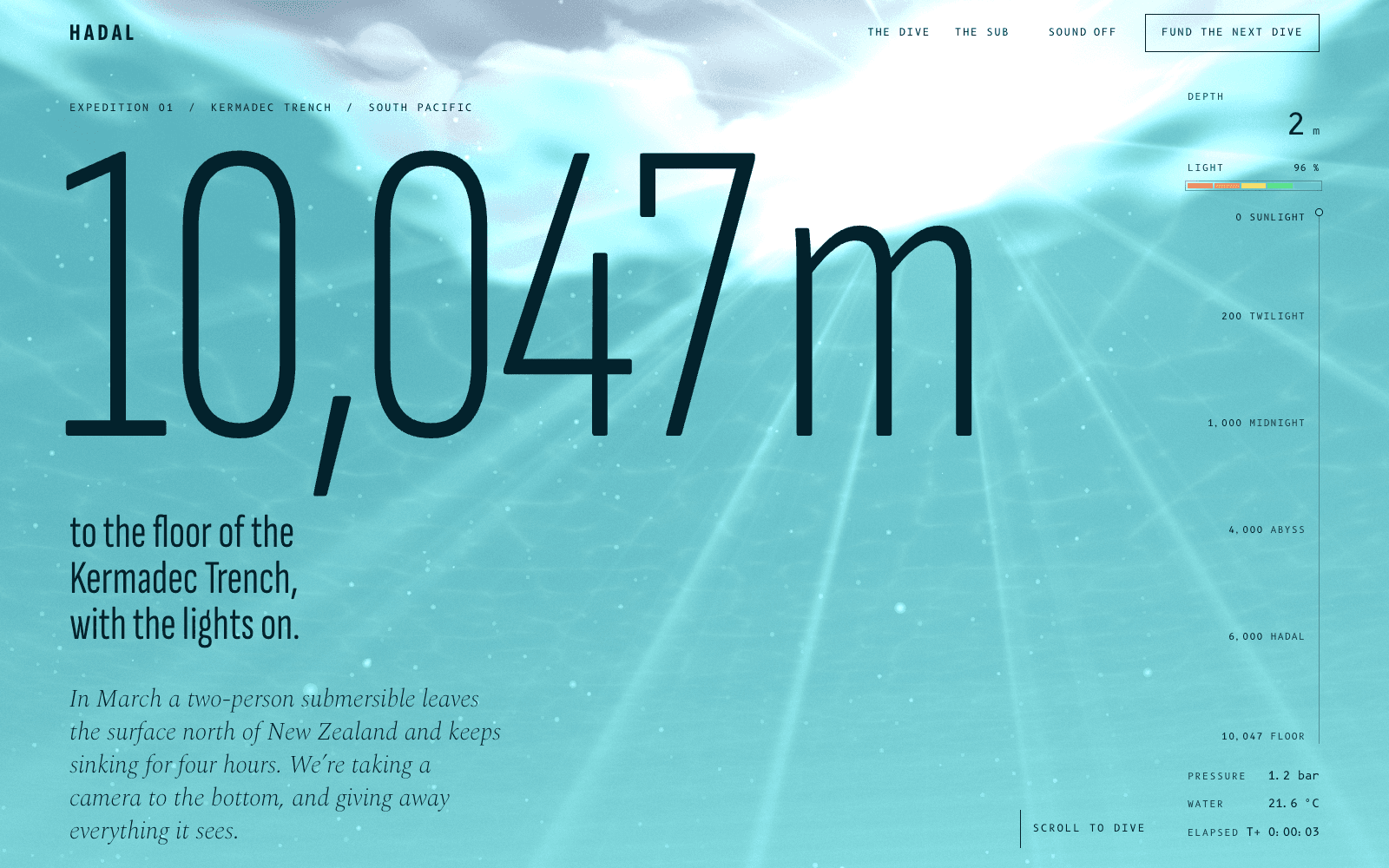
To see the difference on a real page, we captured HADAL, one of our concept sites: a scroll-driven dive to the floor of the Kermadec Trench, with a full-screen WebGL scene behind the text. We served it locally on 6 October 2026 and read it three ways: the raw HTML with curl, and the accessibility tree and a screenshot with Playwright 1.63 driving headless Chrome at 1440 by 900.
The server HTML is 31 KB and holds about 940 words: the whole story, every section heading and one <canvas>. A crawler that runs no JavaScript still gets everything the page says.
The accessibility tree at load holds the header links and buttons by name, the H1 with its paragraph, and a heading for every later section. But it has only 4 paragraphs. After we scrolled to the bottom, it had 42. Each section's copy is set to visibility: hidden until its scroll moment reveals it, and hidden content leaves the tree. The canvas is marked aria-hidden="true", so the tree rightly skips it. An excerpt from the tree at load:
- main:
  - region "10,047 m to the floor of the Kermadec Trench, with the lights on.":
    - heading "10,047 m to the floor of the Kermadec Trench, with the lights on." [level=1]
    - paragraph: In March a two-person submersible leaves the surface north of New Zealand and keeps sinking for four hours.
  - region "The sea takes red first.":
    - heading "The sea takes red first." [level=2]
  - region "Lights out.":
    - heading "Lights out." [level=2]
The screenshot shows the opening moment: the hero line, the depth gauge and the 3D scene. At load, the rendered text that isn't hidden comes to 238 words, counting the gauge's labels and the headings further down, and the screenshot shows only the part that fits in the first viewport.
Three readers, three answers. The crawler gets the full text. The tree reader gets an outline until it scrolls. The screenshot reader gets one frame. The fix for the middle case is small: a reveal that animates opacity and transform keeps the text in the tree, while visibility: hidden and display: none take it out.
What each reader needs
For crawlers and fetchers:
- The main text in the HTML the server sends. Check with view-source or
curl, not the DevTools Elements panel, which shows the page after scripts have run. - Real links (
<a href>) to every page that matters, and a sitemap. - Structured data in the server HTML, not added by a script. Structured data for AI search explains why.
- A map for agents: an llms.txt with links to Markdown versions of your pages.
For browser agents that read the tree:
- Native elements: web.dev's guide says to "use
<button>and<a>tags over modified<div>and<span>elements." - A name on every control, and labels tied to their inputs with
for. - Landmarks and a sensible heading order, so the tree reads as an outline.
- Text that stays in the tree before it animates in.
For screenshot readers:
- A stable layout. web.dev notes that agents working from screenshots "will likely be confused if your website layout is constantly shifting."
- Controls that are visible and big enough, with no transparent overlays on top of them.
- No important text baked into images.
Forms can go one step further. WebMCP, a draft from the W3C's Web Machine Learning Community Group that Chrome is testing in an origin trial, lets a form declare itself as a tool an agent can call. In its declarative form, that is a few attributes on markup you already have:
<form toolname="requestQuote" tooldescription="Ask for a quote for a brand identity project." action="/quote">
  <label for="email">Email</label>
  <input id="email" name="email" type="email" required>
  <label for="budget">Budget</label>
  <select id="budget" name="budget" toolparamdescription="The client's budget range in euros.">
    <option>Under 5,000</option>
    <option>5,000 to 15,000</option>
  </select>
  <button type="submit">Send</button>
</form>
Without the toolautosubmit attribute, the person still presses submit, which is the safe default for anything that books time or spends money.
3D and motion sites
A WebGL scene says nothing to the first two readers. That is fine when the scene supports the story and the text tells it. It fails when the scene is the only place the story lives: a product shown only in 3D, or a price drawn into the canvas. Mark a decorative canvas aria-hidden="true", put every fact in HTML text, and keep that text in the tree before it animates in. These are the same habits that make motion work for people using screen readers, covered in accessible motion. The same rule helps performance too: the headline should be HTML, so it can paint before the scene loads (3D website performance).
Check your own pages
Three quick checks, one per reader:
# 1. What a crawler gets: is your headline in the server HTML?
curl -s https://example.com/ | grep -c "Your headline here"
// 2. What a tree reader gets (Playwright 1.49 or later)
const tree = await page.locator("body").ariaSnapshot();
console.log(tree);
- What a screenshot reader gets: load the page at a common laptop size, take one screenshot without scrolling, and ask whether it says what the page is for.
Chrome's Lighthouse also has an experimental Agentic Browsing category (Chrome 150 or later) that checks names, labels, tree integrity, layout stability and whether an llms.txt is present.
On a Laarpi site
Laarpi Surface writes the agent-facing side of every site it publishes: a Markdown twin of every public page, structured data in the server HTML and the forms registered as tools where the browser supports WebMCP. What an AI-ready Laarpi site includes lists the whole agent door.
Sources
Checked 6 October 2026. Standards and vendor pages change; the linked pages are the authority.
- Vercel and MERJ: The rise of the AI crawler (17 December 2024)
- Anthropic: web fetch tool
- Anthropic: browser use tool
- Anthropic: computer use tool
- Anthropic: how site owners can manage Anthropic's crawlers (7 April 2026)
- OpenAI: overview of OpenAI crawlers
- Playwright MCP (Microsoft)
- Google Search Central: AI optimization guide (updated 10 July 2026)
- Google Search Central: JavaScript SEO basics (updated 4 March 2026)
- web.dev: Build agent-friendly websites (updated 1 April 2026)
- Chrome for Developers: WebMCP declarative API (updated 25 September 2026)
- W3C: WAI-ARIA 1.2